Tuesday, February 28, 2017

Query3. Remove Special Characters from Name/String

Today we have received a Query: How to remove special characters from a Name or String. Will do the same by two ways.


We have a list, which contains special characters.


We will remove these special characters by 2 ways.

3 Easy ways to get First Name from Name!

Let's start with a simple example:


Here we have a name list.

We need First name as output in Column E.


1. Using Text-to-Columns


Step 1: First of all we will select the data, which we want to delimit.


Step 2: Then, go to Data tab in excel and select Text to Columns.
You will this pop-up window.

Find last lookup value

Today we will find last lookup value from a range.


We will work on this sales summary report


Scenario: Here we have to find last lookup value from the Sales Summary report.

Step 1: In cell L2, Type the formula:

=INDEX($G:$G,MAX(IF($B$3:$B$14=J2,ROW($B$3:$B$14))))


Friday, February 24, 2017

Query4. Ramji - Concatenate Unique assignments as per the Name

Concatenate unique assignments as per the Name!


Today Ramji asked a question: He has a table, in this table Column B has few names and Column A has their respective assignments. Now he wants the output as in Cell C1. See below image:


Tuesday, February 21, 2017

Query2. Find out Oldest Date based on a Condition

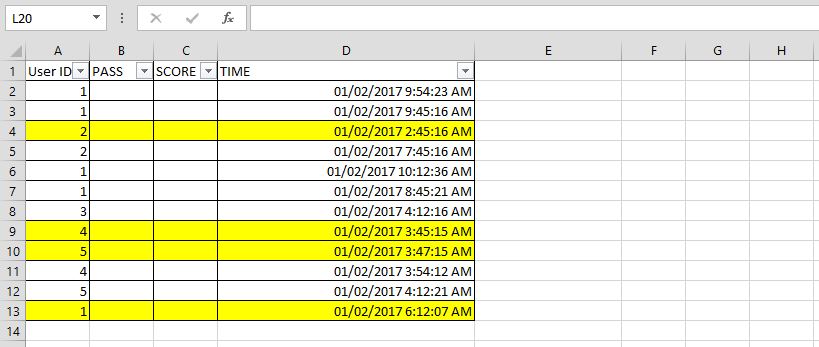
We have to find out oldest date with least time for a particular ID.


Scenario: We have a list which have some User IDs and their Sales time with dates. We have to find out oldest time for each User IDs which are highlighted.


See below image: I Have typed this formula:

"=MIN(IF($A$2:$A$13=A18,$D$2:$D$13))"

Press Ctrl+Shift+Enter, as this is an array function

Sunday, February 19, 2017

The Sum, SumIf, SumIfs Functions

Sum | SumIf | SumIfs

In this post we will learn Sum function.

Sum


The Sum function sums the Numeric values. See below snapshot


The Count, CountIf & CountIfs Function

Count | CountIf | CountIfs

In this post we will learn Count functions.

Count


The Count function counts the range of cells or occurrence of a value which contains Numeric values. See below snapshot: